Case Study: Automating Mortgage Processing with LLM Agents in a Hybrid Cloud Bank
Table of contents
- #Problem Statement
- #Step 0: Why GenAI?
- #Step 1: Requirements
- #Step 2: Architecture, Hybrid Cloud Data Flow
- #Step 3: The Durable Workflow Engine, Where Intelligence Lives (and Doesn’t)
- #Step 4: Multi-Country Expansion, Country as Configuration Not a Fork
- #Step 5: Document Processing Deep Dive
- #Step 6: Cross-Document Verification Deep Dive
- #Failure Modes
- #Operational Concerns
- #Going Deeper
- #References
This post applies the 9-step case study structure from the GenAI System Design Framework.
Problem Statement
A mid-size bank processes 3,000 to 5,000 mortgage applications per month across multiple countries. Each application involves 15 to 25 documents: pay stubs, tax returns, employment letters, bank statements, property appraisals, title deeds, and sometimes more. Today, loan officers manually review every document, cross-reference data across the full set, check compliance against country-specific regulations, and write underwriting narratives summarizing their findings.
Average processing time: 3 to 4 weeks per application. Of that, 30 to 40% is spent on document review and data extraction alone. The rest is waiting on third-party verifications, internal approvals, and the actual underwriting decision. The document work is the bottleneck the bank can actually control.
The bank runs on GCP for compute and AI workloads, but all customer data (core banking records, credit histories, identity documents) lives in on-premise databases. This is not a choice. It is a regulatory and security requirement that varies by country but applies everywhere the bank operates. The bank operates in 3 countries today (UK, Germany, US) with plans to expand to 5 more in the next 2 years.
Primary users: Loan officers who process applications daily. They see extracted data, flagged inconsistencies, and draft narratives. They do not see raw documents through this system (they can always access originals through existing document management systems).
Secondary users: Compliance teams who audit processing decisions and regional operations teams who configure country-specific rules.
What This System Is Not
This is not a credit scoring system. The bank already has ML models for credit scoring, and those are heavily regulated, requiring full explainability. Replacing them with an LLM would be a regulatory non-starter.
This is not a customer-facing chatbot. Mortgage applicants do not interact with this system at all. They submit documents through existing channels.
This is not replacing the loan officer’s judgment on approval decisions. The agent handles the tedious document work: extraction, cross-referencing, inconsistency detection, narrative drafting. It surfaces structured findings so humans can make faster, better-informed decisions. The human always decides.
Step 0: Why GenAI?
The first question is always: does this need an LLM at all? A surprising amount of mortgage processing is already automated or automatable with traditional software.
Where Deterministic Automation Already Works (and Stays)
| Component | Approach | Why It Stays Deterministic |
|---|---|---|
| Credit scoring | Traditional ML models (XGBoost, logistic regression) | Heavily regulated, requires full explainability, well-established |
| Interest rate calculation | Rule engine | Pure math based on rate tables, loan term, credit tier |
| LTV/DTI threshold checks | Rule engine | Loan-to-value and debt-to-income are arithmetic. No ambiguity |
| KYC/identity verification | Specialized vendors (Jumio, Onfido) | Purpose-built, certified, regulatory-compliant |
| Workflow orchestration | Durable workflow engine (Temporal) | State machine logic, retries, timeouts. No reasoning needed |
| Document routing | Classification model + rules | Which department handles which document type. Static logic |
These components are cheaper, faster, more reliable, and more explainable than any LLM-based alternative. Replacing them with an agent would be engineering malpractice.
Where Deterministic Approaches Break Down
The boundary between structured and unstructured is where GenAI earns its cost.
Document format variation. A German Lohnsteuerbescheinigung (wage tax certificate) looks nothing like a UK P60. Even within one country, every employer formats pay stubs differently. Layout, field names, ordering, even which fields are included all vary. Rule-based OCR pipelines work when you have 5 document templates. When you have 500 employers across 3 countries, template maintenance becomes a full-time job for multiple engineers.
Cross-document reasoning. An employment letter says the applicant joined in 2023. Their tax return shows income from the same employer since 2020. Is this a contradiction? Maybe the letter is for a new role at the same company. Maybe someone made a typo. Catching these requires reading multiple documents together and reasoning about what the discrepancy means. This is not pattern matching. It is inference.
Multi-language processing. Expanding to new countries means documents in new languages. Building a German extraction pipeline, then a French one, then a Spanish one, is expensive and slow. A single LLM handles all of them with prompt-level configuration. The extraction quality is not identical across languages (German compound nouns are harder to parse than English field labels), but it is good enough to avoid building per-language systems.
Underwriting narrative generation. Loan officers spend 30 to 60 minutes per application writing up their findings in a structured narrative. Given that the structured data is already extracted and verified, this is a summarization task. An LLM drafts the narrative in seconds. The loan officer reviews and edits, which takes 5 to 10 minutes instead of an hour.
Cost Math
The ROI case needs to be concrete, not hand-wavy.
| Cost Component | Manual Processing | LLM-Assisted Processing |
|---|---|---|
| Loan officer time per application (document review) | 8-12 hours at ~$45/hr = $360-540 | 1-2 hours review + edits at $45/hr = $45-90 |
| LLM inference per application (extraction + verification + narrative) | $0 | ~$2.50-4.00 (15-25 docs x $0.10-0.15 per doc + narrative) |
| Cloud Interconnect bandwidth per application | $0 | ~$0.05 (extracted text, not raw images, for most docs) |
| Template maintenance (per country per year) | $50K-80K engineering cost | $5K-10K prompt tuning cost |
| Error correction downstream | ~$50 per application (rework from missed inconsistencies) | ~$15 per application (fewer misses, some LLM errors) |
| Total per application | $410-590 | $65-115 |
At 4,000 applications per month, that is the difference between $1.6M-2.4M and $260K-460K in monthly document processing costs. Even accounting for infrastructure, model costs, and the engineering team to build and maintain the system, the payback period is under 6 months.
The inference cost per document deserves more detail. A typical mortgage document is 1 to 3 pages. Using a vision-capable model (Gemini 1.5 Pro on Vertex AI), each page costs roughly $0.003 for input tokens (image) plus $0.01-0.02 for output tokens (structured extraction). A 20-document application with an average of 2 pages per document runs about $0.80-1.20 for extraction alone. Cross-document verification adds another $0.50-0.80 (multiple documents in context). Narrative generation adds $0.30-0.50. Total: $1.60-2.50 per application at current Vertex AI pricing.
Step 1: Requirements
Functional Requirements
- Extract structured data fields from mortgage documents across all supported document types and languages
- Cross-reference extracted data across the full document set for a single application
- Flag inconsistencies with severity levels (blocking vs. informational) and supporting evidence
- Generate compliance disclosures per jurisdiction (TILA/RESPA for US, FCA disclosures for UK, BaFin requirements for Germany)
- Draft underwriting narratives from structured findings
- Support human override on any extracted field or flag
Non-Functional Requirements
- Data residency: Customer documents never leave on-prem infrastructure. Only extracted structured data (field names, values, confidence scores) moves to GCP. For countries with stricter rules (Germany), even extracted text may need to stay on-prem with only aggregate results moving to cloud.
- Latency: Full document set processing within 15 minutes for a standard application (20 documents). Individual document extraction under 30 seconds. Loan officers should not be waiting for the system.
- Auditability: Every extraction decision must be traceable. Input document reference, extracted value, confidence score, model version, prompt version, and whether a human modified the result.
- Multi-country extensibility: Adding a new country should be a configuration change (new document types, compliance rules, tool registrations), not a code change.
- Availability: 99.5% during business hours. Documents queue during downtime. No data loss.
Scale Assumptions
| Dimension | Current | Year 2 Target |
|---|---|---|
| Applications per month | 3,000-5,000 | 8,000-12,000 |
| Documents per application | 15-25 | 15-30 (more countries = more doc types) |
| Pages per document (average) | 2 | 2 |
| Total pages per month | 90,000-250,000 | 240,000-720,000 |
| Languages | 3 (English, German, limited French) | 6-8 |
| Countries | 3 | 8 |
| Concurrent applications in processing | 200-400 | 500-1,200 |
| Peak extraction requests per minute | 50-80 | 150-300 |
This is not a high-QPS inference problem. Peak throughput is 300 extraction requests per minute, which is about 5 per second. The challenge is correctness, auditability, and the hybrid cloud data flow, not raw throughput.
Quality Metrics
| Metric | Target | Why This Number |
|---|---|---|
| Field extraction accuracy | >94% | Below 90%, human review volume exceeds manual processing cost. 94% is the breakeven for net time savings |
| Cross-doc flag precision | >85% | False flags waste loan officer time. Below 85%, officers start ignoring flags |
| Cross-doc flag recall | >92% | Missed inconsistencies are the dangerous failure. Higher recall is worth some false positives |
| Narrative edit rate | Under 30% of text modified | If officers rewrite more than 30%, the draft isn’t saving meaningful time |
| Compliance disclosure accuracy | >99% | Regulatory requirement. Wrong disclosures create legal liability |
| End-to-end processing time | Under 15 minutes | Must be faster than the 8-12 hours of manual review to justify the system |
Trade-offs to Acknowledge
| Trade-off | Option A | Option B | Our Lean |
|---|---|---|---|
| Data boundary: what crosses to GCP? | Raw documents to GCP (simpler, better extraction) | Only extracted text to GCP (safer, loses visual layout) | Country-dependent. UK/US: raw docs allowed. Germany: text only |
| Extraction coverage vs accuracy | Attempt all fields, accept lower accuracy | High-confidence extraction on 80% of fields, flag rest for human | Option B. Wrong extractions are worse than missing ones |
| Single model vs specialized models | One frontier model for everything | Smaller models for classification, frontier for extraction | Hybrid. Classifier is a fine-tuned BERT. Extraction uses Gemini Pro |
| On-prem LLM vs cloud LLM | Run models on-prem for full data control | Use Vertex AI, accept data transit over Cloud Interconnect | Cloud (Vertex AI). On-prem GPU infrastructure is 3-5x more expensive to operate and model updates are slower |
Step 2: Architecture, Hybrid Cloud Data Flow
The core design constraint shapes everything: LLM inference runs on GCP (Vertex AI), but customer documents and banking data live on-prem. The architecture must bridge this gap without violating data residency requirements that vary by country.
Components
On-prem document gateway. Receives documents from the bank’s existing document management system. Runs initial digitization (OCR for scanned documents, PDF text extraction for digital documents) using on-prem infrastructure. Depending on the country’s data residency policy, it sends either the raw document images or the extracted text to GCP over Cloud Interconnect (a dedicated, encrypted connection between the bank’s data center and GCP, not the public internet).
GCP processing layer. The agent runtime (document extraction agents, cross-reference agents, narrative generation) runs on GCP, using Vertex AI for LLM inference. The durable workflow engine (Temporal, running on GKE) orchestrates the full application lifecycle.
On-prem data API. A secure, read-only API that agents on GCP call to query banking data: credit records, account history, employment verification records. This data never leaves on-prem. The agent sends a query (“what is the average monthly deposit for account X over the last 12 months?”), and the API returns the answer. The agent never sees raw account data.
Result store. Extracted structured data, flags, and narratives are written back to on-prem systems through the same Cloud Interconnect link. The on-prem result store is the system of record. The GCP result cache is ephemeral.
What Crosses the Boundary?
This is the single most important architectural decision. Three options, each with real trade-offs:
| Option | What Goes to GCP | Pros | Cons | When to Use |
|---|---|---|---|---|
| Raw documents | Full document images and PDFs | Vision model sees layout, tables, signatures. Best extraction accuracy | Regulatory risk in strict jurisdictions. Larger bandwidth | Countries with permissive data rules (UK, US) |
| OCR’d text only | Extracted text from on-prem OCR | No document images leave premises. Lower bandwidth | Loses visual layout context. Tables become garbled text. ~5-8% accuracy drop | Countries with strict data residency (Germany) |
| On-prem extraction, structured output only | Just field-value pairs | Maximum data protection. Minimal bandwidth | Limits LLM reasoning. Can’t handle unusual formats. Requires on-prem GPU | Countries that prohibit any customer data in cloud |
The answer is not one-size-fits-all. The country configuration (covered in Step 4) determines which option applies. For UK and US applications, raw documents go to GCP. For German applications, only OCR’d text goes to GCP, with the on-prem OCR service handling the visual extraction. If a future country prohibits even text transit, the architecture supports running a smaller extraction model on-prem with only structured output crossing the boundary.
The Cloud Interconnect link is provisioned at 10 Gbps with encryption in transit. At peak load (300 pages per minute, average 500KB per page for document images), bandwidth usage is about 150 MB/min or 2.5 MB/sec. This is well within the link capacity, but latency matters more than bandwidth. Each round trip between on-prem and GCP adds 5-15ms of network latency depending on the physical distance between the data center and the GCP region. For a single document extraction, this is negligible. For cross-document verification that makes 3-5 on-prem API calls, it adds up to 50-75ms. Still acceptable, but worth monitoring.

Step 3: The Durable Workflow Engine, Where Intelligence Lives (and Doesn’t)
The mortgage lifecycle (Application Received, Document Collection, Verification, Underwriting, Decision, Closing) is a state machine. A durable workflow engine owns this state machine. Not an LLM. Not an agent.
This is a point worth emphasizing because it is tempting to build the whole thing as an agentic loop: “here’s a mortgage application, figure out what to do.” That approach fails for three reasons.
First, regulatory auditability. Regulators want to see a defined process with clear checkpoints. “The model decided to check compliance after extraction” is not auditable. “Step 4 of the workflow is compliance check, triggered after step 3 completion” is.
Second, failure recovery. If the system crashes mid-processing, a durable workflow engine (Temporal, in this case) picks up exactly where it left off. An agentic loop would need to re-reason about the entire application state.
Third, human intervention points. When a loan officer needs to review a flag, the workflow pauses at a defined checkpoint and resumes when the officer acts. A free-form agent loop has no natural pause points.
What Is an Agent and What Is Not
| Workflow Step | What Runs | Why |
|---|---|---|
| Document intake and storage | Durable workflow engine | Deterministic: receive document, validate format, store in document management system, update application status |
| Document type classification | Fine-tuned BERT classifier | Classification, not generation. 50+ document types across 3 countries. A 110M parameter model handles this at sub-10ms latency |
| Data extraction from individual documents | LLM agent (Gemini Pro via Vertex AI) | Unstructured documents, varied formats, needs visual understanding for tables and layouts |
| Cross-document verification | LLM agent with tool access | Requires reading multiple documents together, reasoning about contradictions, querying on-prem APIs for corroboration |
| Compliance threshold checks | Deterministic rules engine | LTV must be under 80%. DTI must be under 43%. These are arithmetic checks with country-specific parameters |
| Compliance disclosure generation | LLM generation with retrieval | Country-specific disclosure language, but the content is standardized. RAG over disclosure templates |
| Underwriting narrative draft | LLM generation | Summarizing structured findings into human-readable narrative. Pure generation task |
| Final decision | Human (loan officer) | The agent surfaces findings. The human decides. Always |
The agents (extraction, cross-document verification, narrative generation) run as activities within the Temporal workflow. Each activity has a timeout (extraction: 60 seconds per document, cross-document verification: 120 seconds, narrative generation: 90 seconds). If an activity times out, the workflow engine retries with exponential backoff, up to 3 attempts. If all retries fail, the application is routed to a manual processing queue with all partial results preserved.
The Agent’s Think-Act Loop
The cross-document verification agent is the most genuinely “agentic” component. It does not follow a fixed script. It reasons about what it sees and decides what to investigate next. Here is a concrete example:
- Extract fields from the pay stub: employer “Acme Corp,” annual salary $85,000, pay period March 2026.
- Compare with employment letter: employer “Acme Inc,” start date January 2023, annual salary $75,000.
- Notice two discrepancies: employer name mismatch (“Corp” vs “Inc”) and salary mismatch ($85,000 vs $75,000).
- Reason: The name could be a legal name vs. DBA situation. The salary difference could be a raise between when the letter was written and the current pay stub.
- Act: Query the tax return via on-prem data API. The tax return shows employer TIN (Tax Identification Number) matching “Acme Corp” and reported income of $83,500 for the previous year.
- Evaluate: TIN match confirms same entity (name variant, not a different employer). Income trajectory ($83,500 last year, $85,000 current) is consistent with a raise. The employment letter’s $75,000 is likely the starting salary from 2023.
- Resolve: Flag as informational (name variant detected, income consistent with career progression), not blocking.
This is genuine ReAct-style reasoning. But it is bounded inside a single Temporal activity with a 120-second timeout. The agent cannot decide to go check the applicant’s social media or call an external verification service. Its tools are limited to: read extracted data from other documents in the application, query the on-prem data API for banking records, and write flags with severity and evidence.

Step 4: Multi-Country Expansion, Country as Configuration Not a Fork
The bank operates in 3 countries today and plans to expand to 8. The worst possible architecture would be: fork the codebase per country. Separate UK pipeline, separate German pipeline, separate US pipeline. Every bug fix applied 3 times. Every model update deployed 3 times. Every new feature built 3 times.
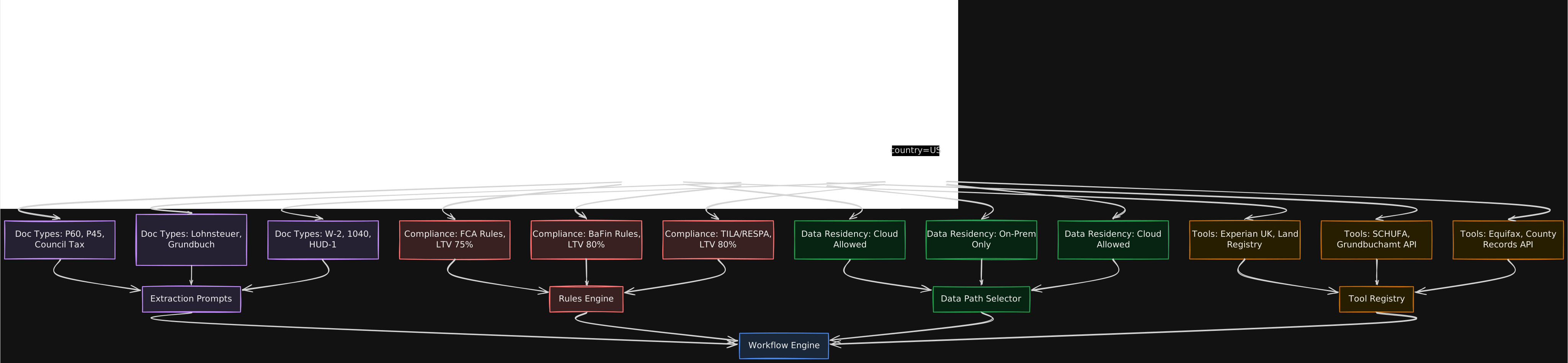
Instead, country differences are captured in configuration that the workflow engine and agents read at runtime. Adding a new country means adding a configuration object, not writing new code.
What Changes Per Country
| Dimension | UK | Germany | US |
|---|---|---|---|
| Key document types | P60, P45, council tax bill, HMRC statement | Lohnsteuerbescheinigung, Grundbuchauszug, Schufa report | W-2, 1040, HUD-1, Social Security statement |
| Compliance framework | FCA mortgage conduct rules, MCOB | BaFin Wohnimmobilienkreditrichtlinie | TILA, RESPA, Dodd-Frank QM rules |
| Max LTV | 95% (with mortgage insurance) | 80% (typical, varies by lender) | 97% (conventional with PMI) |
| Data residency policy | Cloud processing allowed | Strict: extracted text only, no document images | Cloud processing allowed |
| Credit bureau API | Experian UK, Equifax UK | SCHUFA | Equifax, TransUnion, Experian US |
| Property valuation API | Land Registry, RICS valuation | Grundbuchamt, Gutachterausschuss | County recorder, Zillow/Redfin API |
| Primary language | English | German | English |
| Disclosure templates | ESIS (European Standardised Information Sheet) | ESIS (German version) + BaFin-specific | Loan Estimate, Closing Disclosure |
Country Configuration Structure
# Country config loaded at workflow start, passed to all agents
country_config = {
    "country_code": "DE",
    "data_residency": {
        "raw_documents_to_cloud": False,
        "extracted_text_to_cloud": True,
        "structured_output_to_cloud": True,
        "on_prem_extraction_required": False
    },
    "document_types": {
        "income_proof": ["lohnsteuerbescheinigung", "gehaltsabrechnung"],
        "property_title": ["grundbuchauszug"],
        "credit_report": ["schufa_auskunft"],
        "employment": ["arbeitgeberbescheinigung"],
        "bank_statements": ["kontoauszug"]
    },
    "compliance_rules": {
        "max_ltv": 0.80,
        "max_dti": 0.40,
        "disclosure_template": "esis_de_v3",
        "regulatory_framework": "bafin_wikr"
    },
    "tool_registry": {
        "credit_bureau": "schufa_api_v2",
        "property_registry": "grundbuchamt_api",
        "employment_verification": "elster_api"
    },
    "extraction_config": {
        "primary_language": "de",
        "extraction_model": "gemini-1.5-pro",
        "ocr_service": "document_ai_de",
        "prompt_template_version": "de_v4"
    }
}
When a new application arrives, the workflow engine reads the country code, loads the corresponding configuration, and passes it to every downstream activity. The extraction agent uses it to select the right prompt templates and document type schemas. The compliance check uses it to load the right rules. The tool calls use it to route to the right credit bureau and property registry.
Adding a new country (say, France) means creating a new configuration file with French document types, French compliance rules, and French tool registrations. The workflow code, agent code, and infrastructure are unchanged. The extraction prompts need tuning for French document types, which is a prompt engineering task, not a software engineering task.
The one exception: if a new country has entirely different data residency requirements (say, on-prem LLM inference required), the infrastructure team needs to provision on-prem GPU capacity. This is an infrastructure change, not a code change, but it is not trivial.
Step 5: Document Processing Deep Dive
Document extraction is the hardest technical problem in this system. It is where the LLM does the heavy lifting, and where most of the accuracy challenges live.
The Document Processing Pipeline
Each document flows through a multi-stage pipeline:
Stage 1: Type classification. Before extracting anything, the system needs to know what kind of document it is looking at. A pay stub, a tax return, an employment letter, and a bank statement all have different extraction schemas. The classifier is a fine-tuned BERT model (not an LLM, classification does not need generation) trained on 10,000+ labeled mortgage documents across all supported types. Accuracy: 97.5% on known document types, with a “unknown/other” category for documents that do not match any known type.
For unknown documents, the system falls back to a generic extraction prompt that asks the LLM to identify the document type and extract whatever structured fields it can find. These always go to human review.
Stage 2: Vision model vs. OCR + text approach. This is not a binary choice. The system uses both, depending on document quality and data residency.
| Approach | When to Use | Accuracy | Cost | Data Residency |
|---|---|---|---|---|
| Vision model (Gemini Pro with image input) | High-quality scans, digital PDFs, countries allowing raw doc transit | 94-96% field accuracy | $0.01-0.03 per page | Document image goes to GCP |
| OCR (Document AI) + text-based LLM | Poor quality scans, handwritten notes, countries restricting image transit | 88-92% field accuracy | $0.005-0.01 per page (OCR) + $0.005-0.01 (LLM) | Only text goes to GCP |
| Vision model on-prem | Countries prohibiting any cloud transit | 90-93% (smaller model) | $0.02-0.05 per page (GPU amortization) | Nothing leaves on-prem |
The quality assessment happens on-prem. The document gateway runs a lightweight image quality check (resolution, contrast, skew angle) and a text extraction attempt. If the text extraction produces garbled output (common with poor scans or handwritten documents), the document is flagged for vision model processing.
Stage 3: Field extraction with structured output. The extraction prompt is specific to the document type (loaded from the country config). It includes the expected output schema, a few examples of correct extractions for that document type, and explicit instructions for handling edge cases.
# Extraction prompt template for UK P60
extraction_prompt = """
You are extracting structured data from a UK P60
(End of Year Certificate).

Extract the following fields. For each field, provide:
- field_name: the canonical field name
- value: the extracted value
- confidence: your confidence score (0.0 to 1.0)
- source_location: where on the document you found this

Required fields:
- employer_name (text)
- employer_paye_ref (format: ###/XXXX)
- employee_name (text)
- national_insurance_number (format: XX######X)
- tax_year (format: YYYY-YYYY)
- total_pay (numeric, GBP)
- total_tax_deducted (numeric, GBP)
- employee_ni_contributions (numeric, GBP)

If a field is not present, set value to null and
confidence to 0.0.

If a field is partially legible, extract what you can
and set confidence accordingly.

Respond in the following JSON schema:
{schema}

Document:
{document_content}
"""
The key design choice: structured output with a defined JSON schema. The LLM is not generating free-form text. It is filling in a schema. This means downstream systems always get clean, typed data. No parsing surprises. Vertex AI’s structured output mode (response_schema parameter) enforces the schema at the token level, so the model cannot produce output that does not conform.
Stage 4: Confidence scoring. Each extracted field gets a confidence score from the LLM. But LLM confidence scores are not calibrated out of the box. A model that says “0.95 confidence” might be wrong 15% of the time at that score level. The system includes a calibration layer trained on historical extractions where human reviewers verified the correct values.
The calibration works like this: for every (document type, field, raw LLM confidence) triple, the system looks up the historical accuracy at that confidence level. If the LLM says 0.90 for “employer_name” on German pay stubs, and historically that field is correct 96% of the time at 0.90 raw confidence, the calibrated confidence is 0.96. If the LLM says 0.90 for “total_pay” on handwritten receipts, and historically that is correct only 78% of the time, the calibrated confidence is 0.78.
Fields with calibrated confidence below 0.85 are flagged for human review. Fields below 0.70 are not used in downstream processing at all (they are shown to the loan officer as “low confidence, please verify manually”).
Stage 5: Cross-reference check. This is where the verification agent takes over (covered in detail in Step 3’s think-act loop). The extraction agent produces structured data for each document independently. The verification agent reads the full set and looks for inconsistencies.
How “RAG for Knowledge, Fine-tune for Behavior” Applies
The extraction system uses both retrieval and fine-tuning, but for different purposes.
RAG for knowledge: When the extraction agent encounters an unfamiliar document format (a pay stub from an employer it has not seen before), it retrieves similar document examples from an indexed store of previously processed documents (with PII redacted). These examples are included in the prompt as few-shot demonstrations. The retrieval is by document type and visual similarity (embedded document layout features). This means the agent’s knowledge of document formats updates continuously as new documents are processed, without any model retraining.
Fine-tuning for behavior: The extraction agent’s behavior (how it formats confidence scores, how it handles ambiguous fields, when it flags vs. resolves) is shaped by fine-tuning on 5,000 human-reviewed extraction examples. The fine-tuned model consistently follows the output schema, assigns calibrated confidence scores, and handles edge cases (partial values, multiple possible interpretations) in a predictable way. This behavior does not change when new document formats are added. It is baked into the model weights.
The boundary is clean: new document knowledge arrives through retrieval (updated continuously). Extraction behavior is set through fine-tuning (updated quarterly, with offline evaluation before deployment).

Handling Multi-Page Documents
Many mortgage documents span multiple pages. A bank statement is 3 to 12 pages. A tax return can be 5 to 15 pages. The extraction approach depends on document length.
For documents under 5 pages: send all pages in a single LLM call. The context window of Gemini 1.5 Pro (1M tokens) easily handles this. The model sees the full document and can reason about cross-page references (like a subtotal on page 1 that should match line items on pages 2 and 3).
For documents over 5 pages: split into logical sections (detected by headers, page breaks, or section markers) and extract each section independently, then run a reconciliation pass that checks for cross-section consistency. This is not about context window limits (the model can handle the full document). It is about extraction accuracy. Empirically, extraction accuracy drops by 2 to 4% for documents over 5 pages in a single call, likely because the model’s attention becomes diffuse over very long visual inputs.
Handling Poor Quality Scans
About 10 to 15% of documents are poor quality scans: low resolution, skewed, partially cut off, or with handwritten annotations. The pipeline handles these through a quality-aware routing system.
- On-prem quality assessment: resolution check (below 150 DPI is flagged), skew detection, text extraction attempt
- If quality is sufficient: proceed with vision model extraction
- If quality is borderline: run both vision model and OCR + text extraction, use the higher-confidence result
- If quality is poor (below 100 DPI, heavy skew, significant portions cut off): flag for human review with a note explaining the quality issue. Do not attempt automated extraction on documents that are likely to produce unreliable results. A missing extraction is better than a wrong one.
Handwritten annotations (common on employment letters and property appraisals) get special handling. The vision model can read most handwriting, but confidence scores on handwritten fields are systematically lower. The calibration layer accounts for this: a 0.80 confidence on a handwritten field maps to roughly 0.65 calibrated confidence, which triggers human review.
Step 6: Cross-Document Verification Deep Dive
The verification agent is the most complex component in the system. It is also where the most business value comes from, because it catches inconsistencies that human reviewers often miss when they are processing documents one at a time.
What the Agent Verifies
| Check | Documents Involved | What It Looks For | Severity |
|---|---|---|---|
| Income consistency | Pay stubs, tax returns, employment letter, bank statements | Salary figures should be consistent across documents (allowing for timing differences and raises) | Blocking if >15% discrepancy |
| Employment continuity | Employment letter, tax returns (multi-year) | Continuous employment claimed should match tax filing history | Blocking if gaps not explained |
| Property value vs. purchase price | Appraisal, purchase agreement | Appraisal at or above purchase price for LTV calculation | Blocking if appraisal < purchase price |
| Identity consistency | All documents | Name, address, dates of birth should match across documents (allowing for name variants) | Blocking if name mismatch cannot be resolved |
| Debt obligations | Bank statements, credit report, loan application | Declared debts should match what shows up in credit report and bank statements | Informational (for DTI calculation accuracy) |
| Date consistency | All documents | Document dates should be recent (within bank’s recency requirements, typically 30-90 days) | Blocking if documents are stale |
The Verification Agent’s Architecture
The verification agent runs as a ReAct loop within a Temporal activity. It has access to three tools:
- read_extracted_data(document_id): Returns the structured extraction for a specific document in the application
- query_banking_data(account_id, query_type, params): Queries the on-prem data API for banking records (account balances, transaction history, credit bureau data)
- write_flag(field, severity, evidence, recommendation): Records a verification finding
The agent’s system prompt includes the verification checklist (the table above) and instructions for how to reason about discrepancies. Critically, it also includes examples of discrepancies that are NOT problems:
- Name spelled “MacDonald” on one document and “Mcdonald” on another (common variant)
- Salary on pay stub is slightly higher than employment letter (raise since letter was written)
- Address on tax return is different from current application (applicant moved)
These “false positive” examples are important. Without them, the agent flags every minor inconsistency, and loan officers learn to ignore the flags. The false positive rate goes up, the system’s credibility goes down, and eventually nobody looks at the flags at all.

Bounding the Agent
The verification agent is the closest thing to a “free-form reasoning” component in this system. That makes it the riskiest. Two guardrails keep it bounded:
Timeout: The Temporal activity has a 120-second timeout. If the agent has not completed verification within 120 seconds, the activity fails and the workflow engine either retries or routes to human review. In practice, verification completes in 30 to 60 seconds for a typical application. The 120-second timeout catches runaway loops where the agent keeps querying for corroboration that does not exist.
Tool budget: The agent is limited to 15 tool calls per verification run. Each read_extracted_data call counts as 1. Each query_banking_data call counts as 1. Each write_flag counts as 1. This prevents the agent from making 50 API calls trying to resolve an ambiguous situation. If it cannot resolve a discrepancy in 15 tool calls, it flags it for human review and moves on.
These constraints are not about cost (though they help). They are about predictability. A loan officer needs to know that when they come in to work, the overnight batch has processed and results are ready. An agent that occasionally spends 10 minutes on one application and delays the rest of the queue breaks that expectation.
Failure Modes
Every production system fails. The question is how.
Silent Extraction Errors (The Dangerous One)
What happens: The LLM extracts a field value with high confidence, but the value is wrong. For example, it reads “$85,000” as the annual salary from a pay stub, but the actual value is “$65,000” (the “6” in the scan looks like an “8”).
How likely: About 1 to 3% of fields at the 0.90+ confidence level, based on calibration data. At 20 documents per application with 8 to 12 fields each, that is 1 to 5 silently wrong fields per application.
How to detect: The cross-document verification agent is the primary defense. If the pay stub says $85,000 but bank deposits average $5,400/month ($64,800 annualized), the agent catches the discrepancy. But this only works when there is a corroborating document to check against. For fields that appear in only one document (like a property’s lot size from the appraisal), there is no cross-reference.
How to handle: (1) Calibrated confidence scoring, so the system knows which fields at which confidence levels are actually reliable. (2) Mandatory human review for high-impact fields (income, property value, outstanding debts) regardless of confidence score. (3) Dual extraction: run the extraction twice with different temperature settings and flag any field where the two runs disagree. This catches about 60% of silent errors at the cost of doubling extraction compute.
On-Prem Data API Downtime
What happens: The verification agent tries to query banking records (credit history, account balances) and the on-prem API is unavailable. The agent cannot cross-reference.
How likely: On-prem systems typically have lower availability than cloud services. Budget for 1 to 2 hours of downtime per month during maintenance windows and occasional unplanned outages.
How to detect: API health checks every 30 seconds. The workflow engine checks API availability before starting verification activities.
How to handle: The workflow engine pauses verification activities and moves to the next application in the queue. When the API comes back, paused applications resume. If the API is down for more than 4 hours, applications are routed to a manual processing queue with a note that automated cross-referencing was not possible. Partial results (document-to-document verification that does not require API calls) are still provided.
Unsupported Document Format or Language
What happens: An applicant submits a document in a language or format the system does not support. A French tax return in a system configured for UK, Germany, and US.
How likely: Rare if the intake process is well-configured (document requirements are communicated upfront). But it happens, especially for applicants who recently relocated from a non-supported country.
How to detect: The document type classifier outputs “unknown” with high confidence (the model is trained to recognize what it does not know). Language detection runs on extracted text.
How to handle: Route to human review with the original document and a note: “Document type not recognized. Language detected: French. Manual processing required.” Do not attempt extraction on unsupported types. A failed extraction with partial results is worse than no extraction, because downstream systems might use the partial results.
Name Mismatches That Are Not Fraud
What happens: The verification agent flags a name discrepancy that is actually a legitimate variant. “Catherine Smith” vs. “Kate Smith.” “Mohammed Al-Rahman” vs. “Mohammad Alrahman.”
How likely: Very common. In multi-country processing, name transliteration alone accounts for 5 to 10% of all name mismatches across documents. Married name vs. maiden name is another frequent source.
How to detect: The agent tries to resolve these using the on-prem data API (check if both names are associated with the same customer record). The calibration layer also tracks historical false positive rates for name mismatches per country, feeding back into the agent’s examples.
How to handle: The agent’s system prompt includes explicit examples of legitimate name variants (shortened names, transliteration differences, maiden names). When a name mismatch is detected, the agent first checks for these patterns before flagging. If the mismatch fits a known pattern and is supported by other corroborating identity data (same date of birth, same address, same national ID number), it resolves as informational rather than blocking.
Workflow Engine Failure Mid-Application
What happens: The Temporal cluster or a worker node crashes while processing an application.
How likely: Temporal is designed for exactly this scenario. Worker crashes are expected, not exceptional. The cluster itself has high availability with multiple replicas.
How to detect: Temporal’s built-in heartbeat mechanism. Workers send heartbeats during long-running activities. If a heartbeat is missed, the cluster reassigns the activity to another worker.
How to handle: This is Temporal’s core value proposition. The workflow state is durably persisted. When a worker crashes, a new worker picks up the workflow from the last checkpoint. No data is lost, no work is repeated (assuming activities are idempotent, which they are by design). The loan officer does not even know it happened.
Cloud Interconnect Latency Spikes
What happens: Network latency between on-prem and GCP spikes from the normal 5 to 15ms to 200ms or higher. Every API call to the on-prem data API slows down. Verification that normally takes 30 to 60 seconds takes 3 to 5 minutes.
How likely: Uncommon but not rare. Network congestion, maintenance on the interconnect, or routing changes can cause transient spikes. Budget for 1 to 2 events per month lasting 15 to 60 minutes.
How to detect: Latency monitoring on every cross-boundary call. P95 latency alerts at 50ms (warning) and 200ms (critical).
How to handle: (1) The workflow engine increases activity timeouts dynamically when it detects elevated latency (from 120 seconds to 300 seconds). (2) Non-critical on-prem API calls are batched to reduce round trips. (3) Results from on-prem API calls are cached in the GCP result cache for the duration of an application’s processing. If the same banking data is needed by multiple verification checks, it is fetched once. (4) If latency exceeds 500ms sustained for more than 10 minutes, new application processing is paused and queued until the network stabilizes.
Operational Concerns
Monitoring
Three monitoring dimensions matter most:
Extraction accuracy per country and document type. This is the core quality metric. Tracked through a continuous feedback loop: when loan officers modify an extracted value, that correction is logged as ground truth. Weekly accuracy reports per (country, document type, field) triple. If accuracy for German pay stubs drops below 90%, the on-call team investigates (prompt regression? new employer format?).
Latency across the hybrid boundary. Every cross-boundary call (document transit to GCP, on-prem API queries, result writes back to on-prem) is instrumented with traces. Dashboards show P50, P95, and P99 latencies broken down by call type and country. Alerts fire on P95 regression.
Agent tool call success rates. Track the verification agent’s tool calls: how often does query_banking_data succeed vs. fail? How many tool calls per verification run on average? A spike in tool call count (say, from an average of 8 to an average of 14) might indicate the agent is struggling with a new document type or a prompt regression that causes it to chase false leads.
Cost Breakdown
| Cost Category | Monthly Cost (3 countries, 4K applications) | Notes |
|---|---|---|
| Vertex AI inference (extraction) | $4,000-5,000 | ~$1.00-1.25 per application for extraction |
| Vertex AI inference (verification) | $2,500-3,200 | ~$0.60-0.80 per application |
| Vertex AI inference (narrative) | $1,500-2,000 | ~$0.35-0.50 per application |
| Cloud Interconnect (10 Gbps dedicated) | $1,700 | Fixed monthly cost, shared across all workloads |
| GKE cluster (Temporal workers + agent runtime) | $3,000-4,000 | 8-12 nodes, autoscaling |
| On-prem OCR service (Document AI on-prem) | $2,000-3,000 | Hardware amortization + licensing |
| On-prem data API infrastructure | $1,500 | Allocated cost of API servers and load balancers |
| Total infrastructure | $16,200-20,400 | |
| Total per application | $4.05-5.10 | |
| Manual processing cost per application (document review only) | $360-540 | 8-12 hours at $45/hr |
| Net savings per application | $355-535 | |
| Monthly savings | $1.42M-2.14M | At 4,000 applications |
The cost comparison is not even close. Even doubling the infrastructure costs for safety margin and adding a 3-person engineering team ($75K/month loaded cost), the system pays for itself many times over. The real risk is not cost. It is accuracy. If extraction quality is bad enough that loan officers spend nearly as much time correcting the system’s output as they would have spent doing it manually, the time savings evaporate.
Compliance Audit Trail
Every interaction between the system and a mortgage application is logged:
- Document ingestion: timestamp, document hash, source channel, document type classification result
- Extraction: input document reference, model version, prompt version, every extracted field with its value, raw confidence, calibrated confidence
- Verification: every tool call (query sent, response received), every comparison made, every flag written with evidence
- Narrative generation: input structured data, generated narrative text, model version
- Human modifications: every field that a loan officer changed, with before/after values and timestamp
This audit trail is stored on-prem (it contains references to customer documents). It is immutable (append-only, no updates or deletes). Compliance teams can query it to answer questions like: “For application X, show me every extracted value, the confidence level, whether it was human-verified, and the evidence chain for every flag.”
For regulatory exams, the bank can demonstrate that (1) every LLM decision has a traceable input, (2) confidence levels are calibrated and monitored, (3) humans reviewed all blocking flags, and (4) model and prompt versions are tracked so any extraction can be reproduced.
Model Updates and Rollouts
Prompt and model updates are the riskiest operational change. A new prompt template that improves German pay stub extraction might degrade German employment letter extraction. A Vertex AI model version update might change extraction behavior in subtle ways.
The rollout strategy:
- Shadow mode: New prompt/model runs alongside the current production version. Both extract from the same documents. Results are compared but only the production version’s output is used. Run for 1 to 2 weeks, comparing field-by-field accuracy.
- Canary rollout: New version handles 5% of applications for a specific country. Loan officers see both versions’ outputs and can flag which is better. Run for 1 week.
- Gradual rollout: 5% to 25% to 50% to 100%, with accuracy monitoring at each stage. Any accuracy regression triggers automatic rollback.
- In-flight applications: Applications that started processing on version N complete on version N. The workflow engine records the model/prompt version at the start of processing and uses that version for all subsequent activities on that application. This prevents an application from getting half its documents extracted with one version and half with another.
Human Override Flow
When a loan officer disagrees with an extracted value or a flag:
- Officer modifies the value in the review interface. The modification is logged with before/after values.
- The system re-runs downstream checks that depended on the modified value. If the officer changes the income figure, the DTI check re-runs automatically.
- The correction is added to the training data pool for future fine-tuning cycles (with officer permission and PII handling).
- If the same field from the same document type is corrected more than 10% of the time across all officers, an automatic alert fires to the ML team to investigate whether the extraction prompt needs tuning.
The correction feedback loop is critical for continuous improvement. Without it, the system’s accuracy is frozen at whatever level it launched with. With it, the system gets better every month as more corrections accumulate and feed back into prompt tuning and calibration.
Going Deeper
Fine-Tuning Per Document Type vs. Few-Shot Prompting
The extraction system could take two approaches for handling the variety of document formats:
Few-shot prompting (current approach for most document types): Include 2 to 3 examples of successful extractions for the specific document type in the prompt. The examples are retrieved from a curated library based on the document type classification. This approach is flexible (adding a new document type means adding examples, not retraining) and works well when the base model is strong enough.
Fine-tuning a specialized extraction model (used for the highest-volume document types): For document types that represent more than 20% of total volume (UK P60s, German Lohnsteuerbescheinigungen, US W-2s), fine-tuning a smaller model (Gemini Flash or equivalent) on 2,000 to 5,000 human-verified extraction examples produces 2 to 4% higher accuracy than few-shot prompting with a frontier model, at 60 to 70% lower inference cost.
The trade-off: fine-tuned models are harder to update. If the P60 format changes (it has changed twice in the last 5 years), you need new training data and a retraining cycle. Few-shot prompting adapts immediately to format changes by updating the examples. For high-volume, stable document types, fine-tuning wins. For the long tail of less common document types, few-shot prompting is more practical.
Caching Strategies for On-Prem API Calls
The on-prem data API is the latency bottleneck in the hybrid architecture. Every call crosses the Cloud Interconnect with 5 to 15ms base latency, plus the API’s own processing time.
Two caching layers help:
Application-level cache (in the GCP result cache): When processing an application, the first query for a customer’s credit history caches the result. Subsequent queries during the same application’s processing (verification agent checking income against credit report, then checking debts against credit report) hit the cache. TTL: 1 hour (long enough for a single application’s processing, short enough that stale data is not a concern).
Cross-application cache (shared, with strict invalidation): For data that does not change frequently (property registry lookups, employer verification), results can be cached for 24 hours. This helps when multiple applications involve the same property (refinancing a previously processed property) or employer. Cache invalidation fires on any update to the underlying on-prem record.
The caching is not optional. Without it, a single application’s verification phase makes 15 to 25 on-prem API calls. At 10ms per call, that is 150 to 250ms of network latency alone. With caching, unique calls drop to 5 to 8 per application.
Building a Document Type Classifier
The document type classifier deserves more detail because it is the first stage in the pipeline and its errors cascade.
Architecture: A fine-tuned BERT model (110M parameters) that takes the first 512 tokens of OCR’d text from a document and classifies it into one of 50+ document types (across all supported countries). Training data: 10,000 labeled documents from the bank’s historical archives, augmented with 5,000 synthetic examples generated by paraphrasing and reformatting real documents.
Why not use the LLM for classification? Cost and latency. The classifier runs in under 10ms on a single CPU core. The LLM would take 1 to 2 seconds and cost 100x more. At 4,000 applications per month with 20 documents each, that is 80,000 classification calls per month. At $0.001 per LLM call, the classifier saves $80/month. Not a huge number, but it adds up, and the latency improvement matters more than the cost savings.
The classifier also includes a calibrated “unknown” threshold. If the maximum softmax probability is below 0.70, the document is classified as “unknown” rather than forced into the highest-probability category. This prevents the classifier from confidently misclassifying a document type it has not been trained on (which would cause the extraction agent to use the wrong schema and produce garbage output).
Handling Regulatory Changes as Config Updates
Mortgage regulations change. LTV limits get adjusted. Disclosure requirements are updated. New compliance checks are added. The system needs to absorb these changes without code deployments.
The compliance rules engine is configured through versioned rule files (stored in the country config):
# compliance_rules_uk_v12.yaml
rules:
  - name: ltv_check
    type: threshold
    field: calculated_ltv
    max_value: 0.95
    condition: "if mortgage_insurance then 0.95 else 0.75"
    effective_date: "2026-01-01"

  - name: dti_check
    type: threshold
    field: calculated_dti
    max_value: 0.45
    effective_date: "2025-06-01"

  - name: stress_test
    type: calculation
    formula: "monthly_payment_at(current_rate + 3.0) / monthly_income"
    max_value: 0.45
    effective_date: "2024-01-01"

  - name: disclosure_esis
    type: template
    template_id: "esis_uk_v8"
    required_fields: ["apr", "total_cost", "monthly_payment", "early_repayment_terms"]
    effective_date: "2025-09-01"
When a regulation changes, the compliance team updates the rule file and increments the version. The workflow engine picks up the new version for new applications. In-flight applications continue with the version that was active when they started processing. The audit trail records which rule version was applied to each application.
Disclosure template updates work similarly. The narrative generation agent retrieves the current disclosure template for the country and populates it with the application’s data. A template update is a content change, not a model change.
The risk: a regulatory change that requires a genuinely new type of check (not a parameter change, but a new calculation or validation that the rules engine does not support). This requires engineering work to extend the rules engine. The goal is not to make all regulatory changes zero-code, but to make 80 to 90% of them configuration-only. The remaining 10 to 20% are engineering projects with clear scope.
References
- Google Cloud Interconnect Documentation - Dedicated connections between on-prem and GCP
- Temporal.io Documentation - Durable workflow execution engine
- Vertex AI Structured Output - Enforcing JSON schemas on LLM output
- Anthropic: Building Effective Agents - Agent design principles (bounded agents over autonomous loops)
- FCA MCOB Handbook - UK mortgage conduct regulations
- BaFin Wohnimmobilienkreditrichtlinie - German residential mortgage lending regulations
- TILA-RESPA Integrated Disclosure Rule - US mortgage disclosure requirements
- Google Document AI - On-prem OCR and document processing
- BERT: Pre-training of Deep Bidirectional Transformers - Architecture used for document type classification
- Gemini 1.5 Pro Technical Report - Vision-capable model used for document extraction
- ReAct: Synergizing Reasoning and Acting in Language Models - Think-act loop pattern used in verification agent
- Heavybit: RAG vs Fine-tuning - RAG for knowledge, fine-tune for behavior
- SCHUFA Credit Bureau - German credit reporting
- UK Land Registry - Property title verification for UK
- Platt Scaling for Calibrated Confidence - Calibrating LLM confidence scores
- LangGraph Documentation - State machine patterns for bounded agents
- Cloud Interconnect SLA - Availability guarantees for hybrid connectivity
Note: This blog represents my technical views and production experience. I use AI-based tools to help with drafting and formatting to keep these posts coming daily.
← Back to all posts