Model Quantization as a Hardware Bottleneck Problem
Quantization is an approach of compressing the model parameters to reduce the size of the model in GPU’s memory. It converts millions of higher precision 16-bit floating numbers and maps them down to lower precision 8 or 4 bits.
LLM inference is fundamentally memory-bandwidth bound. Quantization is the primary lever we have to fit larger models into fewer GPUs, reduce the time spent moving data across the memory bus, and make serving unit economics viable.
1. The Core Bottleneck: Memory Bandwidth
To understand why quantization matters for speed, you have to look at the roofline model of a GPU. A GPU has two main constraints:
- Compute (TFLOPS): How fast the Tensor Cores can multiply matrices.
- Memory Bandwidth (TB/s): How fast the GPU can move data from High Bandwidth Memory (HBM) into the SRAM next to the compute cores.
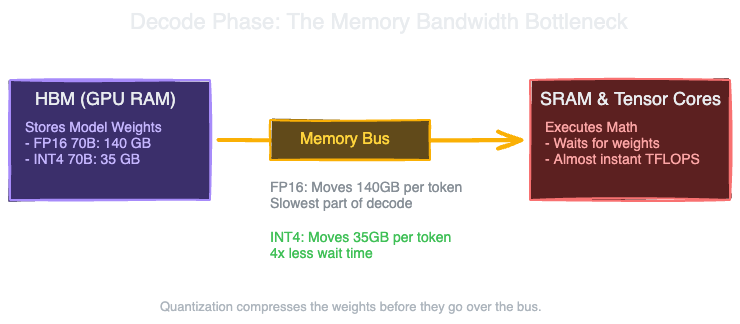
During the prefill phase (processing the input prompt), the model performs large matrix-matrix multiplications. It loads the model weights once and multiplies them against all the input tokens at once. This heavily utilizes the compute cores. Prefill is compute-bound.
During the decode phase (generating tokens one by one), the model performs matrix-vector multiplications. To generate a single token, the GPU must load every single parameter of the model from HBM into SRAM, multiply it by the single current token state, and then write the result back. The compute cores finish their math almost instantly. They spend the vast majority of their time waiting for the weights to arrive from memory. Decode is memory-bandwidth bound.
If you want to generate tokens faster, increasing compute (TFLOPS) does not help. You have to move data across the memory bus faster. The only two ways to do that are to buy a GPU with faster HBM (like moving from an A100 to an H100) or to make the data smaller.
2. The Baseline Cost: FP16 Math
Models are typically trained in 16-bit precision: FP16 or BF16. Every parameter takes 2 bytes.
A 70 billion parameter model in FP16 requires 140 GB of VRAM just to store the weights. NVIDIA’s standard data center GPUs, the A100 and H100, top out at 80 GB of VRAM.
To serve a 70B model in FP16, you must shard the model across at least two 80GB GPUs using Tensor Parallelism (TP=2). In reality, you need TP=4 because you also need space for the KV cache and activation memory.
Requiring 4 GPUs to serve a single model instance destroys unit economics. If you can compress those weights from 16 bits down to 8 bits or 4 bits, you cut the VRAM requirement in half or by a quarter. A 70B model in 4-bit quantization takes 35 GB. It now fits on a single 80GB GPU with 45 GB left over for a massive KV cache.
3. What is Quantization?
Quantization maps higher-precision numbers (16-bit) to lower-precision buckets (8-bit or 4-bit integers).
The simplest mathematical form is linear quantization. You find the minimum and maximum values in a tensor, divide that range into discrete buckets (256 buckets for 8-bit, 16 buckets for 4-bit), and assign each floating-point weight to its nearest bucket.
To use the weight during computation, you need a scale factor and a zero point to map the integer back to a floating-point value. This reverse process is called dequantization.
Group Quantization
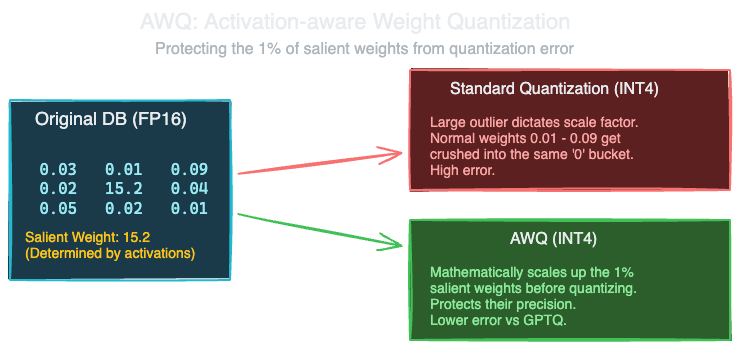
Applying one scale factor to an entire weight matrix leads to high accuracy loss because weight distributions contain outliers. If a single outlier weight is massive, it forces the scale factor to be large, which crushes the precision of all the normal weights into a single bucket.
The standard industry fix is group quantization. Instead of one scale factor per matrix, the matrix is divided into groups of 64 or 128 weights. Each group gets its own scale factor. This adds a slight storage overhead (the scale factors themselves are stored in FP16), but preserves model accuracy significantly better than tensor-wise quantization.
4. Post-Training Quantization (PTQ) Methods
You do not need to retrain a model to quantize it. Post-Training Quantization algorithms apply mathematical techniques to the weights of an already-trained model.
Weight-Only vs Weight-and-Activation
- W8A16 or W4A16: The weights are quantized to 8-bit or 4-bit. The activations (the token data flowing through the network) remain in 16-bit. Before the matrix multiplication, the weights are dequantized back to FP16 in the GPU registers, and the math is done in FP16. This is the most common approach. It solves the memory bandwidth bottleneck for decode without severe accuracy loss.
- W8A8: Both weights and activations are quantized to 8-bit. The actual math is executed using INT8 Tensor Cores. This speeds up the compute-bound prefill phase as well as decode. However, activations are notoriously difficult to quantize without accuracy loss because they contain massive dynamic outliers that change per request.
Leading PTQ Algorithms
GPTQ GPTQ processes the model layer by layer. It uses a small calibration dataset to measure how the weights interact. It relies on second-order Hessian information to adjust the remaining unquantized weights to compensate for the error introduced by the weights it just quantized. It is highly optimized for fast inference and is the standard for 4-bit weight-only deployment.
AWQ (Activation-aware Weight Quantization) AWQ operates on the insight that not all weights are equally important. About 1% of the weights, termed “salient weights”, have a disproportionate impact on the model’s accuracy. If you quantize those 1% heavily, the model degrades. AWQ looks at the activation patterns from a calibration dataset to identify these salient weights. Instead of keeping them in FP16 (which ruins hardware efficiency), AWQ mathematically scales up the salient weights and scales down the corresponding activations before quantization. This pushes the salient weights into higher-resolution buckets, protecting them from quantization error. For 4-bit deployment, AWQ often preserves accuracy better than GPTQ.
SmoothQuant SmoothQuant tackles the W8A8 problem. Activations have extreme outliers that make them hard to quantize. Weights are relatively smooth. SmoothQuant mathematically shifts the quantization difficulty from the activations to the weights. It scales down the activation outliers and scales up the corresponding weights. This makes the activations smooth enough to quantize to INT8 without catastrophic accuracy drops.
5. Serving Trade-offs
Quantization is not a free lunch. It trades compute efficiency for memory efficiency, and it trades precision for speed.
Quality Degradation
Evaluating quantization degradation by looking at generic benchmark perplexity is misleading. A model quantized to 4-bit might show only a 0.1 increase in perplexity but fail entirely at specific tasks. Code generation and complex math degrade faster under aggressive quantization than standard text summarization. If your use case relies on precise syntax matching or strict schema outputs, 4-bit quantization may require extensive fallback testing. W8A16 generally shows zero noticeable degradation across all tasks.
Latency Overhead
Weight-only quantization (W4A16) requires the GPU to dequantize the weights in the CUDA kernels right before the multiplication. This adds compute overhead. Because decode is memory-bandwidth bound, the time saved by moving 4-bit weights across the bus from HBM completely overshadows the compute penalty of the dequantization kernel. You get a massive net speedup. However, during prefill (which is compute-bound), the memory bus is not the bottleneck. The dequantization kernel overhead actually slows down prefill compared to raw FP16. Systems like vLLM handle this by optimizing kernels aggressively or routing prefill and decode to different hardware setups.
Hardware Dependencies
Not all GPUs support all quantization formats natively in hardware. INT8 Tensor Core math is supported on A100 and H100. FP8 natively is only supported on the Hopper architecture (H100). If you design a serving stack around FP8 to get W8A8 speedups without the algorithmic complexity of SmoothQuant, your deployment is hardware-locked to H100s or newer.
6. The Decision Matrix
When building an inference platform, the quantization choice dictates your hardware fleet and your latency bounds.
| Configuration | VRAM Reduction | Decode Speedup | Prefill Speedup | Quality Drop | Primary Use Case |
|---|---|---|---|---|---|
| FP16 (Baseline) | None | 1.0x | 1.0x | None | Medical, Legal, exact retrieval |
| W8A16 (INT8) | ~50% | ~1.5x | ~0.9x | Negligible | General purpose text, simple chat |
| W4A16 (AWQ/GPTQ) | ~75% | ~2.5x | ~0.8x | Mild to Moderate | High-throughput consumer chat |
| W8A8 (SmoothQuant) | ~50% | ~1.5x | ~1.8x | Moderate | High-batch summarization |
| FP8 (Hardware) | ~50% | ~1.5x | ~1.8x | Negligible | H100 fleets only |
For the majority of latency-sensitive serving setups today, 4-bit weight-only quantization (AWQ or GPTQ) is the default choice. It provides the largest reduction in VRAM, enabling sharded deployments to collapse onto single GPUs, while maximizing the decode speedup necessary for real-time streaming.
Note: This blog represents my technical views and production experience. I use AI-based tools to help with drafting and formatting to keep these posts coming daily.
← Back to all posts